How to Build a Hybrid Meeting Culture That Works for Everyone
Hybrid meetings—where some participants are in a conference room and others join remotely—are now the norm. Getting them right requires deliberate design, not just better cameras. This guide covers the cultural norms, technology setup, and facilitation techniques that make hybrid meetings fair and productive for everyone.
The Hybrid Meeting Problem in Numbers
Hybrid work is not a phase. According to Gallup's 2025 workplace survey, 53% of remote-capable employees now work hybrid, up from 42% in 2022. Yet research from Microsoft's Work Trend Index shows that 43% of remote participants feel excluded from hybrid meetings, and only 1 in 4 organizations have updated their meeting norms since adopting hybrid. The result: disengagement, repeated decisions, and talent attrition that compounds quietly.
Meeting Format Comparison
Not every meeting should be hybrid. Understanding when each format works best helps you choose deliberately instead of defaulting to "everyone on Zoom."
| Dimension | Fully In-Person | Fully Remote | Hybrid |
|---|---|---|---|
| Equality of voice | High (same room) | High (same screen) | Low by default—requires design |
| Spontaneous brainstorming | Excellent | Moderate (breakout rooms help) | Poor unless structured |
| Scheduling flexibility | Low (everyone commutes) | High (any location) | Moderate (room + remote sync) |
| Recording & async access | Rarely recorded | Easy to record | Easy—essential for equity |
| Tech overhead | Minimal | Moderate (stable internet) | Highest (room AV + individual devices) |
| Best for | Workshops, team bonding | Status updates, 1:1s, async-heavy teams | Cross-office collaboration, large orgs |
Why Hybrid Meetings Are Harder Than They Look
When half the team is in a room and half is on screen, information flows unevenly. In-room participants can read body language and sidebar easily; remote attendees miss hallway context and struggle to interject. Without intentional design, hybrid meetings default to favoring whoever is physically present—leading to disengagement, repeated decisions, and attrition among remote staff.
Principle 1: Equal Voice, Regardless of Location
The core principle of a good hybrid meeting culture is that every participant has equal ability to speak, hear, and be heard. Practically this means:
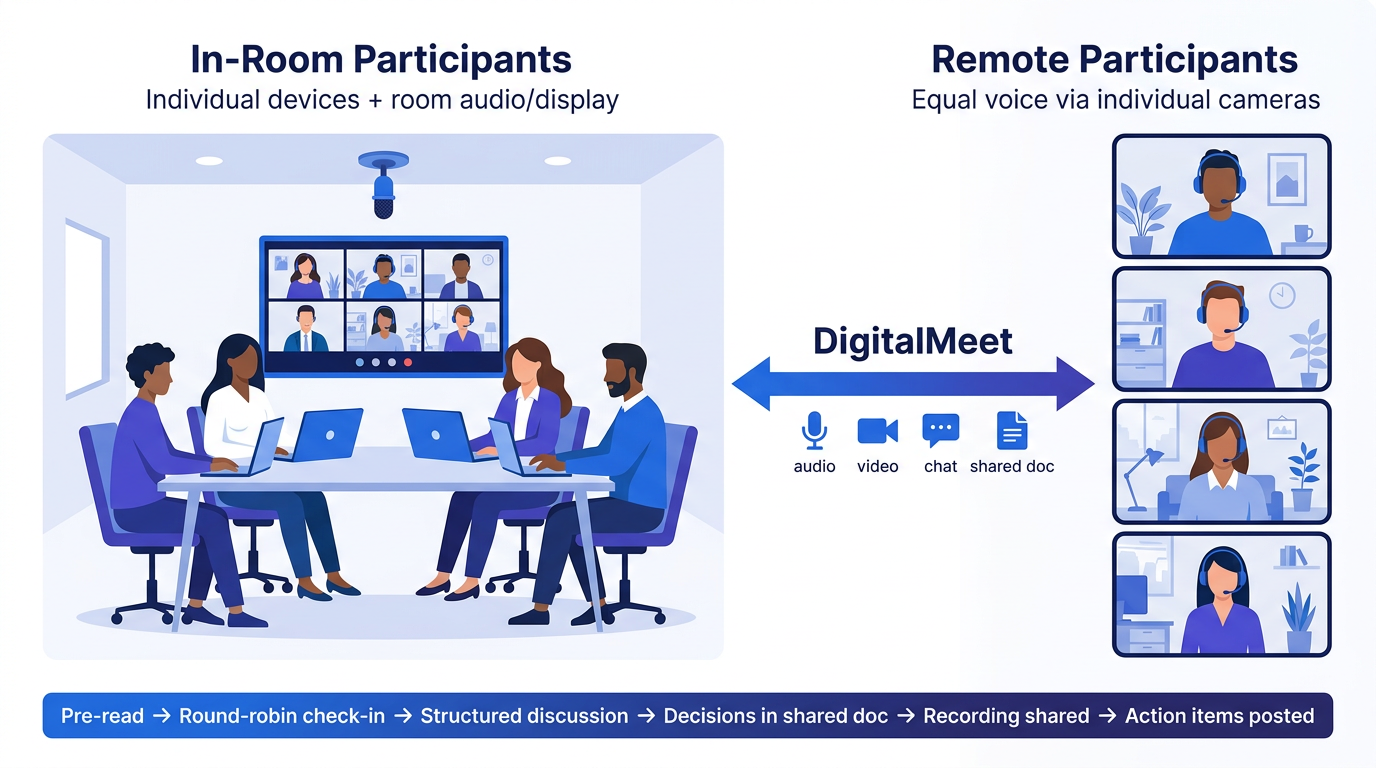
- One person, one screen. Even in-room attendees should join from their laptops so remote participants see individual faces, not a conference-room camera pointed at a table.
- Chat as a first-class channel. Encourage questions and reactions in chat so remote participants can contribute without waiting for a pause.
- Rotate facilitation. Alternate between in-room and remote facilitators so both perspectives shape the agenda.
Principle 2: Invest in Room Technology
Bad audio is the number-one killer of hybrid meetings. A single laptop microphone in a room of six people produces echoes and crosstalk. Invest in:
- Ceiling or table microphones with echo cancellation.
- A large display showing the remote gallery so in-room people look toward the screen, not away from it.
- A dedicated meeting room device or appliance that auto-joins and manages audio/video without someone fumbling with cables.
DigitalMeet supports room-system integrations and adaptive bitrate so remote participants get clear audio and video even when room bandwidth varies. For setup details, see Getting Started with DigitalMeet.
Principle 3: Structure Over Spontaneity
Spontaneous brainstorming favors whoever is loudest or nearest. Replace unstructured discussion with:
- Written pre-reads shared 24 hours before the meeting.
- Round-robin input—explicitly call on each participant by name.
- Async follow-ups—decisions made in the meeting are documented; reactions and objections can be added in writing within 24 hours.
This structured approach benefits introverts, non-native speakers, and anyone in a different time zone. Meeting recording and transcription (see Automated Recording and Transcription) make async catch-up reliable.
Principle 4: Measure and Iterate
You cannot improve what you do not measure. Use meeting analytics to track:
- Talk-time distribution—are remote attendees speaking as much as in-room ones?
- Meeting frequency and duration—are hybrid meetings running longer because of tech issues?
- No-shows and late joins—scheduling friction often hits remote staff harder.
DigitalMeet's analytics dashboards surface these patterns so you can adjust norms with data, not guesses. For a deeper dive, see How to Use Meeting Analytics to Find and Fix Productivity Bottlenecks.
Hybrid Meeting Maturity Model
Use this maturity model to gauge where your organization stands and what to work on next:
| Level | Description | Signs You're Here | Next Step |
|---|---|---|---|
| 1 — Ad Hoc | No standard setup; whoever is in the room runs the meeting | Remote people are muted half the time; no recordings | Standardize room AV and require agendas |
| 2 — Aware | Room AV installed; remote participants can hear | Audio works but remote people rarely speak; no analytics | Adopt one-person-one-screen and chat-first norms |
| 3 — Structured | Equal-voice norms in place; meetings are recorded | Remote and in-room talk time is roughly balanced | Start tracking analytics; iterate on meeting length |
| 4 — Data-Driven | Analytics inform meeting culture; async is used where appropriate | Meeting load is stable or declining; engagement scores rise | Share insights org-wide; pilot AI-assisted summaries |
| 5 — Optimized | Continuous improvement loop; hybrid is a competitive advantage | Hiring and retention cite meeting culture as a positive | Publish internal playbook; contribute learnings externally |
Common Pitfalls to Avoid
- "Camera-on" mandates for remote only. If in-room people are not on camera individually, do not require remote participants to be—it creates an unfair dynamic.
- Relying on one person to relay. A single "bridge" person who repeats what the room said is fragile and excludes remote attendees from real-time discussion.
- Ignoring time zones. Rotate meeting times or record sessions so no group is always meeting outside working hours.
A Sample Hybrid Meeting Playbook
- Share agenda and pre-read 24 h before.
- All participants join from individual devices (in-room audio via room system, video via laptop).
- Facilitator opens with a round-robin check-in—remote participants first.
- Discussion follows the agenda; chat questions are addressed in real time.
- Decisions are captured in a shared doc during the meeting.
- Recording and transcript are shared within one hour for async review.
- Action items are posted in the team channel with owners and deadlines.
Frequently Asked Questions
Do we really need individual cameras if we have a room camera? Yes. Individual cameras ensure remote attendees can see who is speaking and read expressions, which dramatically improves inclusion and engagement.
How do we handle whiteboard sessions in hybrid? Use a digital whiteboard that all participants can see and edit. If a physical whiteboard is used, point a dedicated camera at it and share the digital copy afterward.
What if our internet is unreliable in the office? DigitalMeet's adaptive bitrate adjusts quality automatically. For persistent issues, prioritize meeting traffic on your network or use a wired connection for the room system.